
Development and Hacking
How to Turn Off “Ok Google” on Your Android Device


Actually “Ok Google” is a really useful feature for specific number of people. But still some people does not like it because they don’t like talking to their smartphones. So because of that they want to get rid of it, and here we will show you how to do that.
So in reality there are many possible reasons why you want to remove Ok Google function. For example maybe you never use it, so logically it takes up unnecessary space. Or maybe it is strange for you to talk aloud in your phone, but of course there are many other reasons.
But what is most important and the main question of Google Assistant, is actually how to do that to disable “Ok Google”. Therefore you don’t need to worry because your device has Assistant in the first place, and there is no problems to disable Ok Google.
You have ability to choose in which way you want to disable Ok Google. But don’t worry because we will show you method which works for everyone. Also it is a quite normal that every smartphone with Android operating system has “Google” app, so you will need to launch it.
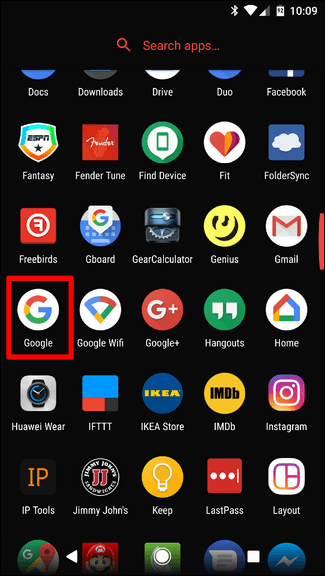
When you do that then you will need to choose settings.
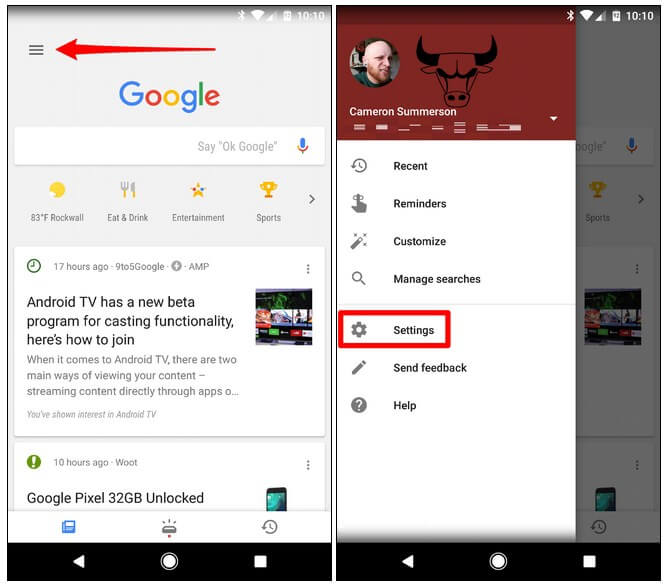
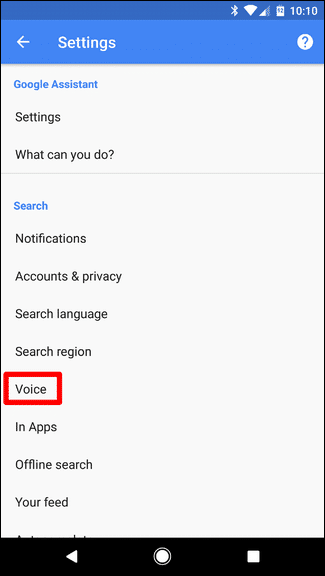
But if your smartphone or any other device has Google Assistant, then you can access settings from here. But additionally you’ll need to click on option Voice.
After that you will need to click on “Ok Google detection.”
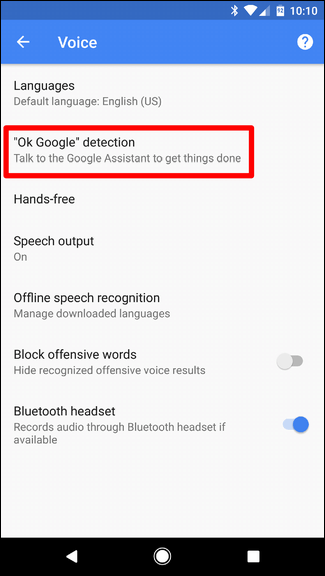
And in the last they will need to click “Say Ok Google” which will logically disable this feature.
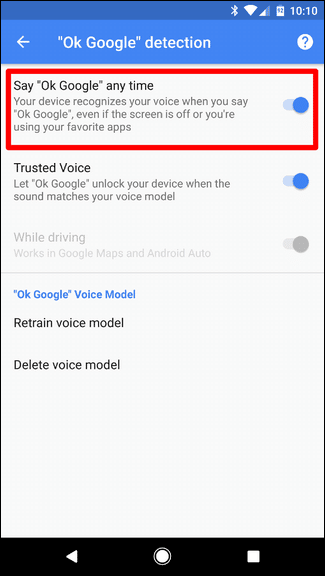
So as you can see it is actually quite easy to do that.

Best Free Music Apps for Android in 2025

Tech Careers In Demand: Best 6 High-Paying Jobs

Top 10 Companies Using Artificial Intelligence

Set Up My New Android Device: Full “How To” Guide In 5 Steps

Switching To A New Android Phone: 6 Key Things You Need To Do


SolarMovie Alternatives: Best Ways to Watch Online Movies For Free
For many, watching SolarMovie was the go-to way to watch online movies for free. Regardless if you are doing it...


Best TheWatchSeries Alternatives: How to Watch Shows Online
Regardless of who you are, there are few things more appealing than nesting into your couch, bed, or bean-bag and...


How to install VXP watch face on any Mediatek smartwatch
Smartwatches are increasingly getting popular in different countries across various age groups. Moreover, many thanks need to be accorded to...


How to share SkyBell HD access with other people
So actually you have bought the SkyBell HD video doorbell, and now you want to make it visible with other...


Elephone S7 Review – Best Galaxy S7 Edge clone
At this moment China has huge number of different smartphone companies, and one of them is definitely Elephone. Which is...


H96 PRO Plus Review – cheapest Amlogic S912 Android box
Yes, you heard right because this Android TV box is the cheapest one with Octa-core ARM Cortex-A53 CPU Amlogic S912....


How to trick Google Play Store with Xiaomi Mi Box Mini allowing All Apps
If you have followed my guide to install the Google Play Store on Xiaomi Mi Box Mini. It is possible...
-

 Development and Hacking10 years ago
How to flash firmware for Rikomagic MK22
-

 Tablets6 years ago
How to repair a Chinese tablet that won’t turn on or charge
-

 Development and Hacking6 years ago
How to install VXP watch face on any Mediatek smartwatch
-

 Reviews10 years ago
H96 PRO Plus Review – cheapest Amlogic S912 Android box
-

 Development and Hacking10 years ago
How to repair write the IMEI numbers using SN Writer tool on MediaTek / MTK phones
-
 Development and Hacking9 years ago
Download H96 MAX (Rk3399) 4Gb/32Gb Custom ROM
-

 Reviews9 years ago
H96 Max Review – cheapest 4GB RAM Android TV box
-
 Reviews10 years ago
Elephone S7 Review – Best Galaxy S7 Edge clone


